 |
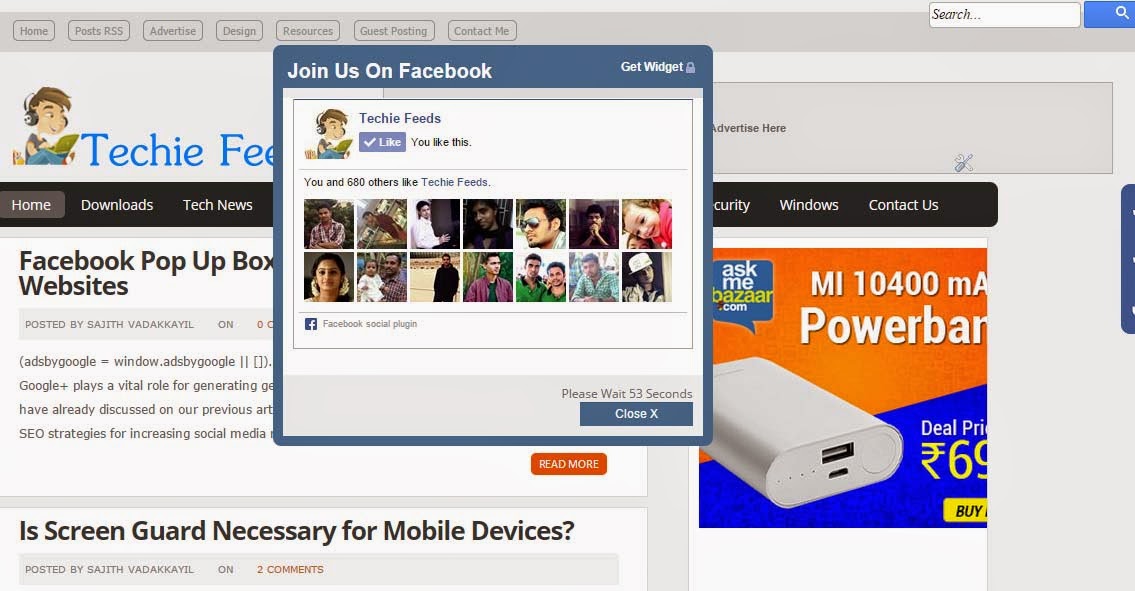
| FaceBook Like Box with auto timer close |
We have already discussed on our previous articles about how to increase Facebook likes and major SEO strategies for increasing social media ranking for your websites or blogs.
Showing a social media promotion boxes while visitors visiting your blogs/websites will be a great idea to make them noticed that you are active on social medias. Major disadvantage of such pop up boxes are they may interrupt visitors buy showing all reloads and this will looks like you are forcing them. So, here we are providing you an auto closing (with timer) facebook pop up widget for your blog.
How to Enable Facebook Pop Up box for blogs/websites
<script type="text/javascript" src="https://ajax.googleapis.com/ajax/libs/jquery/1.8.2/jquery.js"></script>
We have successfully added Jquery code for the box.
3. Now we need to add some style sheets for the box for the looks and feels. Again find the code below in the template
]]></b:skin>
And add the code shown below before closing b:skin tag.
/*css for fbpopup*/

#fbpopupdata {

    background-color: none;

    position:absolute;

    z-index: 9999;

    display: none;

    padding: 0;

    border: 10px solid #446c95;

    -webkit-background-clip: padding-box;

/* for Safari */

    background-clip: padding-box;

/* for IE9+, Firefox 4+, Opera, Chrome */

    -webkit-border-radius: 8px 8px 8px 8px;

    -moz-border-radius: 8px 8px 8px 8px;

    border-radius: 8px 8px 8px 8px;

    width: 420px;

    height: 300;

    overflow: auto;

    left:50% !important;

    margin-left:-220px;

    margin-top:auto;

    box-shadow: inset 0 1px rgba(0,0,0,0.1);

}

#fbpopupdata span {

    font-size: 12px !important;

    font-weight: normal !important;

}

#fbpopupdata h1 {

    background: #446c95 url(https://4.bp.blogspot.com/-wbOyGFuANTQ/UVF1F4ouC4I/AAAAAAAABiA/RX4jNlICbjM/s1600/aktechz-fb-lock.png) 98% 30% no-repeat;

    border: 0px solid #3b5998 !important;

    color: #FFF !important;

    font-size: 20px !important;

    font-weight: 700 !important;

    padding: 5px !important;

    margin: 0 0 10px 0  !important;

    font-family: arial !important;

    overflow: hidden !important;

}

.fbpopupdatadata {

    font-size: 12px !important;

    font-weight: normal !important;

    height: 275px !important;

    padding: 1px !important;

    background: #fff !important;

    border-bottom: 0px solid #ddd;

    overflow: show !important;

}

#fbpopupdatafooter {

    text-align: right;

    font-size:12px;

    background: #F2F2F2 !important;

    height: auto !important;

    padding: 10px !important;

    overflow: hidden !important;

}

#fbpopupdatafooter p {

    text-align: right;

    font-size:12px;

}

#fbpopupdataclose {

    float: right;

    background-color: #446c95 !important;

    border: 0px solid #ccc !important;

    color: #fff !important;

    font-weight: normal !important;

    padding: 5px 35px !important;

    text-decoration: none !important;

    display: inline-block !important;

    font-family: arial !important;

    outline: none !important;

    font-size: 12px !important;

    margin: 0px !important;

    box-shadow: inset 0 1px rgba(0,0,0,0.1);

    -webkit-transition: background 0.3s;

    -moz-transition: background 0.3s;

    transition: background 0.3s;

}
4. Almost completed the final step is here.
<script type=’text/javascript’>
jQuery(document).ready(function() {
function fbpopupdatafunc() {
var sec = 60
var timer = setInterval(function() {
$(“#fbpopupdatafooter span”).text(sec–);
if (sec == 0) {
$(“#fbpopupdata”).fadeOut(“slow”);
clearInterval(timer);
}
},1000);
var fbpopupdatawindow = jQuery(window).height();
var fbpopupdatadiv = jQuery(“#fbpopupdata”).height();
var fbpopupdatatop = jQuery(window).scrollTop()+50;
jQuery(“#fbpopupdata”).css({“top”:fbpopupdatatop});}
jQuery(window).fadeIn(fbpopupdatafunc).resize(fbpopupdatafunc)
//alert(jQuery.cookie(‘sreqshown‘));
//var fbpopupdataww = jQuery(window).width();
//var fbpopupdatawww = jQuery(“#fbpopupdata”).width();
//var fbpopupdataleft = (fbpopupdataww-fbpopupdatawww)/2;
var fbpopupdataleft = 500;
//var fbpopupdatawindow = jQuery(window).height();
//var fbpopupdatadiv = jQuery(“#fbpopupdata”).height();
//var fbpopupdatatop = (jQuery(window).scrollTop()+fbpopupdatawindow-fbpopupdatadiv) / 2;
jQuery(“#fbpopupdata”).animate({opacity: “1”, left: “0” , left: fbpopupdataleft}, 0).show();
jQuery(“#fbpopupdataclose”).click(function() {
jQuery(“#fbpopupdata”).animate({opacity: “0”, left: “-5000000”}, 1000).show();});});
<div class=”fbpopupdatadata”><center><iframe src=”http://facebook.com/plugins/likebox.php?href=https%3A%2F%2Fwww.facebook.com%2F/TechieFeeds&width=400&colorscheme=light&show_faces=true&border_color=%23fff&stream=false&header=false&height=250″ scrolling=”no” frameborder=”0″ style=”border:none; overflow:show; width:400px; height:250px;” allowtransparency=”true”></iframe></center></div><div id=”fbpopupdatafooter”>Please Wait <span>60</span> Seconds<br/><a href=”wwww.techiefeeds.com” target=”_blank” id=”fbpopupdataclose” onclick=”return false;”>Close X</a></div></div>
Change the yellow colored text (techiefeeds) to your Facebook username.
Update (7/01/2015): SumoMe is an awesome tool.