• Skip to primary navigation
  • Skip to main content
  • Skip to primary sidebar

Technology blog

Technology Blog

  • Tech Updates
  • SEO
  • Reviews
  • Google
  • Blogging
  • Windows
  • Downloads
  • Earn-Money Online
  • Android

techiefeeds

Pick the Press Release that works Best For You

December 19, 2012 by techiefeeds Leave a Comment

Living Trading News is constantly updated to bring you economical and investment news and Research around the world. Living Trading News is the leading English news service in Asia.
Livingtradingnews.com was recently launched their press release distributed service targeted for Asia. Currenlty there are four packages are available to download. Basic Press Release, Premium Press Release, Premium Release with Exposure and Premium Release with Exposure. Its costs $99, $199, $299 and $399 respectively.

How These packages Different?? 

What will you Get while Purchasing :

  • Basic Press Release $99

 While you are sharing your news with Basic Press Release version, it just costs $99 only. Your news will send out to thousands of news outlets making it easy for people to find you.And with news, you can also include one image and a link for making customers more engaged. And also it spreads via Social networks too.

  • Premium Press Release $199

  Your news will be Search Engine Optimized on worlds most news release service for SEO. Making people easier to find you. You can include attachments, images and up to two links to engage your customers and people to share your news/story. Use the Social media network technology too.

  •  Premium Release with Exposure $299

 Your news will appear on the front page of Live Trading News. Your news will be search engine optimized, and also can attach video, attachments, image and up to 5 links to engage your customers. Also can use social media networks to fly your news.

  • Premium Release with Exposure $399

Your news will appear on the front page of Live Trading News. Your news will be search engine optimized, and also can attach video, attachments, image and up to 5 links to engage your customers. Also can use social media networks to fly your news. Publicly traded companies will reach the investors, analysts, brokers, financial journals important to their business.

Filed Under: Uncategorized

WeChat – The New way to Chat

October 22, 2012 by techiefeeds Leave a Comment

Chatting is the most commonly used feature of Internet by the youth and common people. It allows us to comment with our colleagues and relatives or even can make new friends over internet. And, there are many Internet and Software companies provides online chatting facility.

 Now, We are going to familiar to you a new chatting software ‘WeChat‘ developed by ‘Tencent’ which is suitable for all most all smartphones including Android, iOS, Symbian ( V3 & V5 ), and Windows ( Blackberry version is coming soon). It supports currently 17 languages including English, Hindi, Spanish etc.. and supports Wi-Fi, 2G, 3G and 4G data. The main feature of new Wechat 4.3 ( Latest version ) is, it supports voice and video calling, Group voice messaging, Moments( sharing including text, photo, video & URL ).

Few Words About  Tencent Company.

‘Tencent’ is the largest Internet Company in APAC with almost 800 million active users. Its the third largest Internet Company globally in terms of investment Capitalization. They launched WeChat Internationaly (iPhone) on October 27, 2011.

WeChat 

As we said earlier, WeChat is a free mobile communication and social networking app for smartphones with features like Video/Audio calling, Push-To-Talk Voice Messaging, Group Chat-Text & voice ( upto 40 people ) and location based friend discovery social features ( shake). It can download and install  from Google Play Store, Nokia store and Windows market place at free of cost. 
We chat also provides a Rock-paper-Scissors mini game, customizable backgrounds, and engaging one-on-one and group session with an extensive range of Animated and custom emoticon and emoji art. Also provides to apply artistic filters to photos and share with your friends on Chat and Moments wall.

WeChat provides a fast and secure social networking access. Protects your data by on-demand data backup and retrieval to/from its cloud based server. And also user registration is much simple by SMS/Voice messaging service. The above mentioned features are the key benefits of WeChat App from other leading chatting apps such as Nimbuzz etc.. They donot provide such fastest and secure user experience.

Shake : Exchange contact information with nearby WeChat users, or connect with WeChat users worldwide  and to be friends with them.

Look Around : Discovers WeChat users near you.

One of the upcoming feature of WeChat is, Powerful Open API. with this feature, users will be able to allow share photo, music, video, games, new and other kind of social network from  other third party Application plugins.

Filed Under: Downloads, Reviews, Tech Updates

Affordable SEO Service

October 12, 2012 by techiefeeds Leave a Comment

Affordable SEO services

Website entrepreneurs want Affordable SEO alternatives to be able to market their organizations on the Online over google. Some SEO organizations can have expensive alternatives and offers, and there are many little companies that cannot afford the price certain organizations charge. To find the organization that is reasonable and expert, entrepreneurs will need to perform analysis. Many organizations have inexpensive price points, but limited outcomes. Consider price compared to outcomes when choosing SEO alternatives. Some SEO organizations are little companies as well and will only be able to provide personal alternatives, and even though others may price more there are organizations who start their offers as inexpensive as one hundred. Companies can even test the ocean by purchasing a single SEO article for about $10. This is very reasonably priced compared to other companies that will not do any work for less than several lots of money.
Having Affordable SEOalternatives will carry more individuals to use your organization instead of going somewhere else. The benefit to having affordable alternatives as a SEO organization is that by giving inexpensive prices one is to be able to gain more company and money. If a SEO organization can only provide personal alternatives it may not carry more customers as those organizations that provide affordable offers, but both are efficient ways to get your company promoted. Authors for both SEO organizations that provide personal or package alternatives will carry outcomes for the consumer.
Website promotion companies can assure you the following SEO benefits:
o Enhanced online visibility
o Site visitors to your website
o An edge over your competitors
o Best return of your investment (ROI)
o Improved sales with better transformation rates
o Reasonable and affordable pricing
In order to provide you with basic advice regarding SEO and to provide the best level of assistance, almost all SEO organizations employ an established team, including content writers, designers, google looks for web page professionals, promotion professionals, and other assistance to employees.
On modern, aggressive company situation, almost every internet marketing company statements to be the best and affordable SEO organization providing affordable SEO along with quick turnaround time. Therefore, it is necessary to ensure that the company you choose is an efficient and efficient one. An extensive analysis could help you decide on the SEO organization that is most appropriate for your SEO needs.
Viral SEO Services, affordable SEO organization provide innovative and affordable SEO alternatives to the customers throughout the UK – US. We have all the resources and quality manpower to provide the expert SEO assistance that’s right for you.

Read More About Me

Filed Under: Earn-Money, SEO

Techie Feeds Guest Posting

October 11, 2012 by techiefeeds Leave a Comment

Techie Feeds invites guest authors and writers who are willing to take part of our 100% revenue sharing program. If you want to get latest updates on various topics, please subscribe to RSS feeds or Email alerts.


Why Write for Techie Feeds ?


 Techie Feeds is a popular Tech blog that features mainly on Computer tips & tricks, Software, business, Security. The aim of Techie Feeds is is to provide the latest updates from the tech world. There are many thing beyong Blogging. Like Search Engine Optimization (SEO), Promoting your site on various places on Internet etc. If you just enjoying writing, leave other things to us. As a guest writer, you can promote your blog to wider audience and still make some money.
We will provide a link back to your profile including your website, profiles such as from Facebook etc. Hence your profiles will get linked from a popular blog and more persons and companies visits you.


100% Revenue Sharing Program.

Guest authors will get 100% Revenue from any ad network for their post. As a guest author, you can post ads with your every post on Techie Feeds.You will get revenue from your post through out your life time.
Guidelines For Posting.

1. Original Work : The post you published must be original and not published anywhere else on the web.

2. Content : You can ad one affiliate/ad link for each post such as from Google Adsense or anything else. Techie Feeds reserves the rights to edit/remove the post by any of its guest authors.

3. Avoid Self Promoting : We will provide a profile link / your site’s link with your name at the end of your post. You can link back to your site articles but that’s allowed when link back is relevant.

4. Copyright : You will retain creative commons for all posts but it will be property of Techie Feeds donot post it anywhere else.If someone is found copying from other site, He/she will banned.

5. Quality : You should able to produce quality contents that suites on our blog. Sponsored Reviews are NOT allowed. We reserve the right to edit the post by you.

If Interested please Fill and send this form to Us or send your interest directly to ‘[email protected]‘. And We will get back you soon! If you have any questions, feel free to contact Us.


php form

powered by 123ContactForm.com | Report abuse

Filed Under: Blogging, Earn-Money

How To Earn Money From SEOclerks

October 11, 2012 by techiefeeds Leave a Comment


Today, We are discussing about a SEO ( Search Engine Optimization ) related freelancer website. SEOclerks is also a better SEO provider starting from $1. Read our article about them here.
You can also find freelancers to do work for you on the same amount or more.
You can simply create some gigs (offers) with expected   cash to do it. Also can bid someone else’s ‘Want to Buy’ gig.

How to Join?

Joining SEOclerks is easy. You can create your account by entering email address, valid password and by choosing available username. Create your FREE Account here.

Make Money With SEOclerks

You can create a gig ( service) by simply selecting Seller tab. And wait for buyers to buy. Or your can find buyers from their ‘Want To Buy’ tab on SEOclerks and bid them using your gigs. 
PS : Keep in mind that your pricing and service should be affordable to get more buyers.
SEOClerks
Proof : My earnings from SEOclerks. 

Withdraw money from SEOclerks?

Withdrawing money from your SEOclerks account is easy. You can withdraw your earnings from your account using PayPal account. This is fast and easy. (If your are Level 1 user, you must have min of $15 to withdraw.)

Affiliate Marketing 

SEOclerks also provides Affiliate marketing program. Affiliate program is simply, SEOclerks gives your a unique link and if any other person joins to SEOclerks via  your link and completed any job, you will get 10% of their income to your Account.

If you have any doubts/comments on above post, Feel free to add it as comment below πŸ™‚

Thanks for reading and sharing πŸ™‚

Filed Under: Earn-Money

Get Free Social Media Followers YouPlusLike

September 6, 2012 by techiefeeds Leave a Comment

Social Networking site like Twitter, Facebook or Google + plays a significant role in the reputation of a company or a professional. Now a days every one knows the importance of Social Networks ( Google+, Facebook, Twitter etc.). Newly born small business organizations, Individuals or even corporate companies are now active on Social Networking world. Social Networking plays a virtual role in in increasing traffic source and exposure. Getting more subscribers ( followers ) means getting more reputation.


Fast Solution for More Free Followers 

YouPlusLike.com provides a fast solution for getting more subscribers such as, Facebook Followers, Twitter Followers, Facebook Likes, Digg followers etc.

What YouPulsLike provides?

  • Facebook Likes 
  • Twitter Followers
  • Google Circles
  • Google +1
  • Website hits
  • Tweets
  • Linked In shares
  • Pinerest shares
  • Myspace Friends
  • YouTube views
  • SoundCloud Followers
  • Stumble upon Followers and even more…. 

How YouPlusLike Works?

YouPlusLike is a Free service. You will earn coins for each action you done such as, Liking a Facebook page, Visiting a webpage, Following someone on Twitter, watching a YouTube video and much more.. 
You can use this coins for your website or for getting followers for you. You can also buy coins at cheap rate  . And also you will get absolutly free 100 coins without any action and also can earn 50 coins for every referrals.


Register Now on YouPlusLike and Get 100 Free coins + 50 for each Referrals.

Free Twitter Followers 

Filed Under: Reviews, SEO

Fix “USB Device Not Recognized” in Windows

September 1, 2012 by techiefeeds Leave a Comment

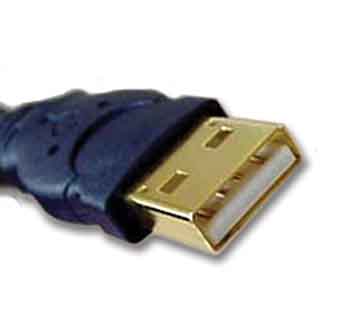
USB Cable, USB device

USB flash drives and USB devices are very much popular today. Every computer devices like, Mouse,Keyboard, Printer, Webcam etc.  comes with USB standard. But sometimes while trying to connect your USB devices or drives to computer ( Assumes windows OS ), you may found an error message “USB Device Not Recognized“. Here we are discussing some ways to troubleshoot this error.

Shut down and Restart

In some cases, just turn off your computer system may resolve your issue. Just shut down and remove and re plug your power supply pin. After a few minutes, Restart computer and re connect your device. It may resolve the issue.

Uninstall and Reconnect USB Device.

If the above method doesn’t  works, try this method.
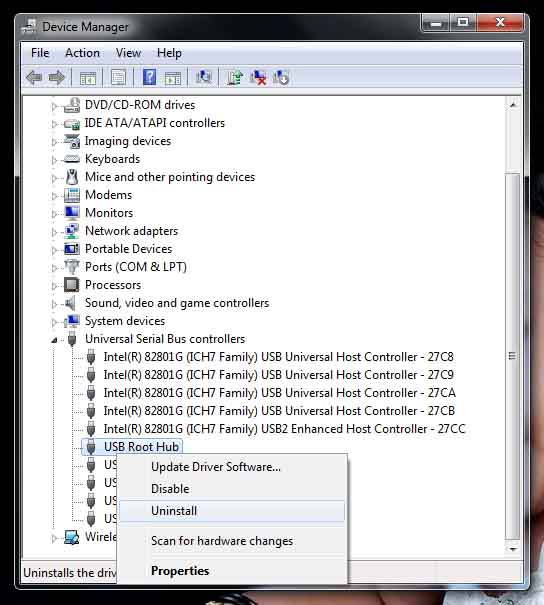
a) Click Start -> Run
b) Type devmgmt.msc and press enter. Device managent window will be open.
c) Find Universal Serial Bus Controller. Expand by clicking (+) button.
d) Right click on USB device and click Uninstall.

Windows Device Manager

e) After the driver is uninstalled, unplug the device
f) Restart you Computer.
g) Plug your USB device.
 Yeah! You are Done πŸ™‚

Re install USB Controllers

If above two method doesn’t work, try this method.
a. Click start > Run
b. Type ” devmgmt.msc ” and hit Enter
c. Right click on device and uninstall. Then Uninstall each USB driver.
d. Restart your computer

Use Microsoft USB Fix Tool

Microsoft provides a software which can automatically diagnoses and repairs USB related common issues. It will be helpful if download and install this tool.
Download Now.

If you have any doubts/comments on above post, Feel free to add it as comment below πŸ™‚
Thanks for reading and sharing πŸ™‚

Filed Under: Tech Updates

How to Delete Files Permanently From Computer

August 13, 2012 by techiefeeds Leave a Comment

We all are familiar with files and folder’s on computer. We probably saves relevant files in folder’s, Drives, or even in desktop. And also every OS including windows and Linux versions provides the facility to remove/delete unwanted files.
While taking Windows, the deleted files should not be deleted permanently from the hard disk. Actually it’s a fecility provided by the widows ( other OS too ) to protect users missing their important files by careless. But unfortunately many of people not care such things or have no idea about it. And it leads to many problems such as misusing confidential files, recollecting personal files while servicing etc.
So today we are discussing about the ways to delete such files permanently. It can do with four simple steps.

Step 1

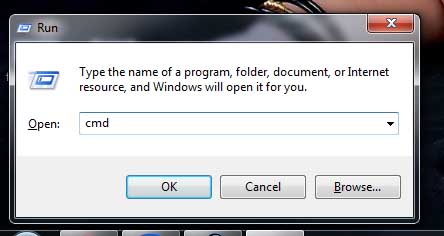
Go to Start > Programs > Accessories > Run.
Or simple press ” Win + R” key combination.

Step 2

Type CMD on it.


Step 3

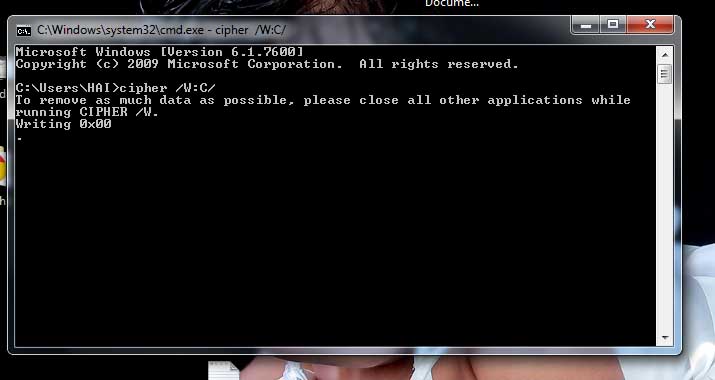
Type cipher /W:C/ on the command window.


Step 4

!!Yeah!! you have done almost!. Close all applications you have opened and press enter.


If you have any doubts/comments on above post, Feel free to add it as comment below πŸ™‚
Thanks for reading and sharing πŸ™‚

Filed Under: security, Tech Updates

What is Alexa Rank?

July 25, 2012 by techiefeeds Leave a Comment

Any person who interested in web designing, SEO or Blogging will definitely heard about Alexa Rank. Like wise Google Page Rank and Moz Rank, Alexa is also a ranking system for websites. In case of Alexa rank, A lower rank is good site ( Google have an Alexa Rank 1).

How Alaxa Rank works?

Here is how Alexa describes their service :

“The traffic rank is based on three months of aggregated historical traffic data from millions of Alexa Toolbar users and is a combined measure of page views and users (reach). As a first step, Alexa computes the reach and number of page views for all sites on the Web on a daily basis. The main Alexa traffic rank is based on the geometric mean of these two quantities averaged over time (so that the rank of a site reflects both the number of users who visit that site as well as the number of pages on the site viewed by those users). The three-month change is determined by comparing the site’s current rank with its rank from three months ago. For example, on July 1, the three-month change would show the difference between the rank based on traffic during the first quarter of the year and the rank based on traffic during the second quarter.”

How to Improve Alexa Rank? 

Improving your Alexa Rank, That means, Approaching to least value is very much easy. Webmasters many ways to do it and it ts easy than any other web rankings such as Page Rank etc. and also is important.
Here is some ways to improve your Alexa Rank.
1) Install Alexa Toolbar on every PC you surf your own website/blog. Alexa only considers the page views by the PC or any device which installed their tool bar. So while you installed Alexa toolbar your Rank sholud  come lower( lower is best).
2) Register on Alexa and let users write about you website on Alexa website.
3) The very easy way is, Alexa provides you a nice Rank if if paid ( Upgraded ) to premium users. And also provide many tools for observing their website/ blogs rating on the web.

4) Place an alexa widget on your blog/website which shows the current Alexa rank. It will helps to improve alexa rank.

5) Write a post about alexa ranking and place link between your’s and Alexa’s website. Alexa consider this too.

Any other ideas to improve Alexa Rank? Add it as comment and Will helps others too.

If you have any doubts/comments on above post, Feel free to add it as comment below πŸ™‚
Thanks for reading and sharing πŸ™‚

Filed Under: Blogging, SEO

Wire Loop / Steady Hand Game: Simple Electronics circuit

July 16, 2012 by techiefeeds Leave a Comment

Today, We are discussing about a circuit which is suitable for middle school and high school students. It is funny and involving hand-on learning.

About the Simple Wire Loop Game.

This game may familiar to you. It is available in market or on some carnival fests, it is introducing as a competition. Its is simple eye-hand coordination game involving a wire on hand and a small hole. The game is, the player need to hold the wire and attempts to guide it through the small hole. When ever the loop touches the sides of hole, Game will finished and a RED LED will starts lighting. We can improve its hardness by reducing diameter of the hole. 

Wire Loop Game Construction Using 555 IC

Here, The player have to touch the point C, via the hole B without touching its sides, using the point A ( Should be covered its touching side by an insulator). While successfully touches the point C, you wins the game and a GREEN LED will blow. If the handle A touches on side of B, the ckt will be OFF and and a RED LED will start lighting.
It is best to reduce the diameter of B (hole) to make the game more interesting. πŸ™‚

Working of Wire Loop Game.

The main component of this circuit is a 555 IC. The 2nd pin ( Trigger ) of IC 555 is connected to +ve and pin 6 ( thresh hold) is connected to –ve. While the circuit is on,   IC output will be on OFF state. and RED LED lights. While getting –ve pulse on pin 2, circuit will be triggered and GREEN LED will start lighting. At this time, if pin 6 gets a +ve trigger, the circuit will be OFF.

Update: You could also give a little electric shock if someone failed the game.

Need any Assistance? feel free to click the chat box on the right bottom(when online).
If you have any doubts/comments on the construction or working of this game, Feel free to add it as comment below πŸ™‚
Thanks for reading and sharing πŸ™‚

Filed Under: Hobby Circuits

  • « Go to Previous Page
  • Page 1
  • Page 2
  • Page 3
  • Page 4
  • Page 5
  • Page 6
  • Go to Next Page »

Primary Sidebar

Copyright © 2026 TechieFeeds.com