• Skip to primary navigation
  • Skip to main content
  • Skip to primary sidebar

Technology blog

Technology Blog

  • Tech Updates
  • SEO
  • Reviews
  • Google
  • Blogging
  • Windows
  • Downloads
  • Earn-Money Online
  • Android

techiefeeds

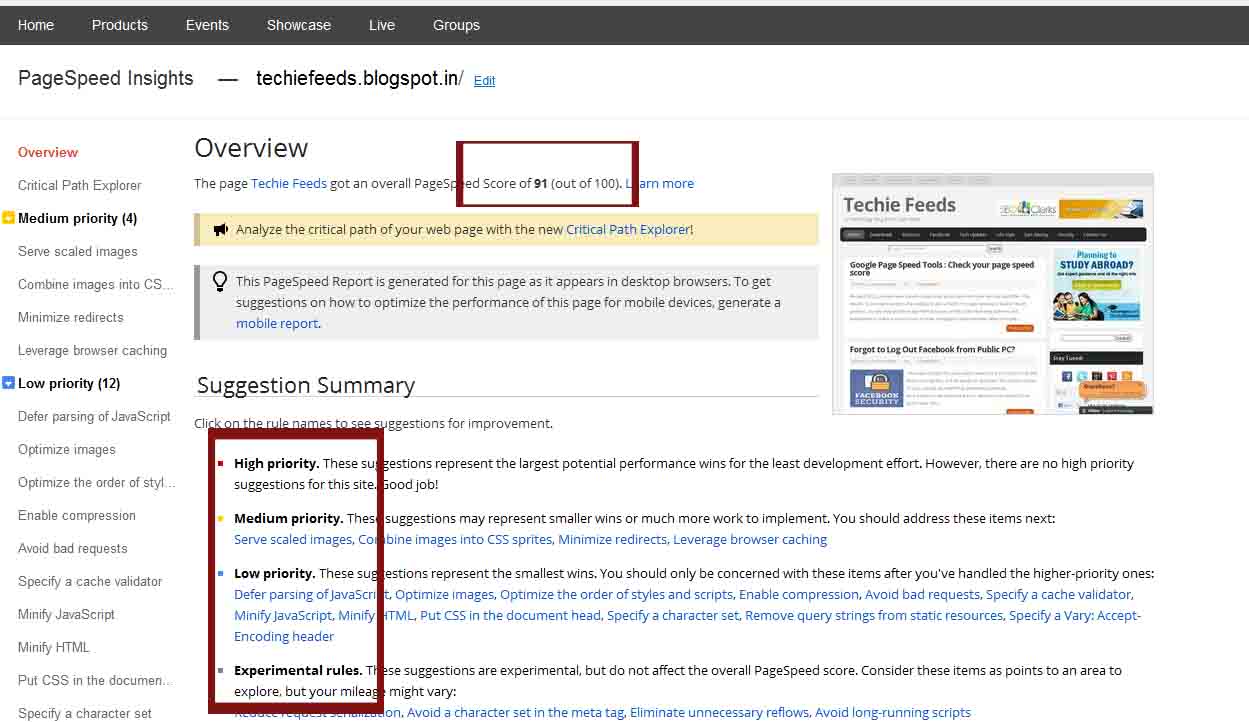
Google Page Speed Tools : Check your page speed score

July 13, 2012 by techiefeeds Leave a Comment

On April 2010, Google have included page load speed also into their ranking algorithm. This means, Now response time of a website is also a factor for page ranking or search result position. Google changed their algorithm because of they just need web authors and webmaster to make a serious look on their webpage’s response time. Many thought that contents is more important than anything else. But page load time have also a significant role in thier traffic. The chance of missing a visitor may occur only because their large load time.

What is Page Load time?

 Page load time is the total time required to load the whole web page. This is depends on the images, scripts and the amount of the content on your web page. While your page takes much more time to load, Its not fare for the development or earnings for your page.The possibility of leaving your site before it loads is very high if it takes more time to load its content. 

Why Page Load Time is Important?

Many web masters and authors very well knows the importance of load time. But they are not focusing on it  accurately.This causes missing of many more visits to their page even if it contains most relevant information. While a user searches for some keyword matches to your page, search engines will lists your page also in results. and when they clicks your page, if it takes much time, the possibility of leaving your page is high. So Google introduced a new product, on their developer page, Pagespeed tools. This lets webmasters and authors to check their page loading speed ranking max. of 100. The only thinf u need to do is, just go to this page and check your page load score. If you get a score below 80 or little score indicates more room for improvement. A a high score indicates less room for improvement. “Techie Feeds” gets 93 out of 100 and we are trying to improve.

Check whether your content makes your blog slower.

It is good that, If add any images, scripts and anything else on your website, compare your current and previously checked page speed scores. If page score becomes low than the score before adding that element, you need to re-size or edit that image or code you added to the webpage for maintain your page speed. You can use Google page speed tool for this purpose.


–>

Filed Under: Blogging, Google, SEO

Forgot to Log Out Facebook from Public PC?

June 24, 2012 by techiefeeds Leave a Comment

 The main problem by using public networks is to forgot to log Out from your mail ID’s or from facebook accounts. This causes misuse of your various accounts from anonymous persons. Now Facebook introduced a way to improve your security from such cases.

It’s an easy way to prevent misusing of your Facebook account by others.
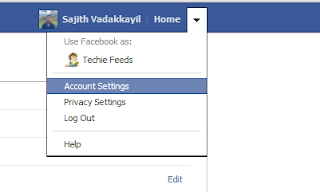
1) Log In to Facebook, Go to Account settings.


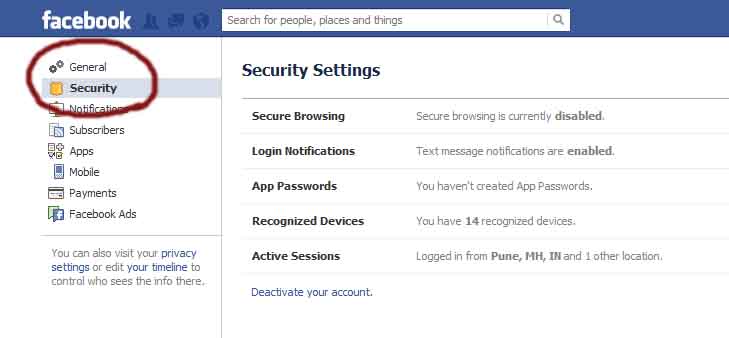
2) Go to Security Tab

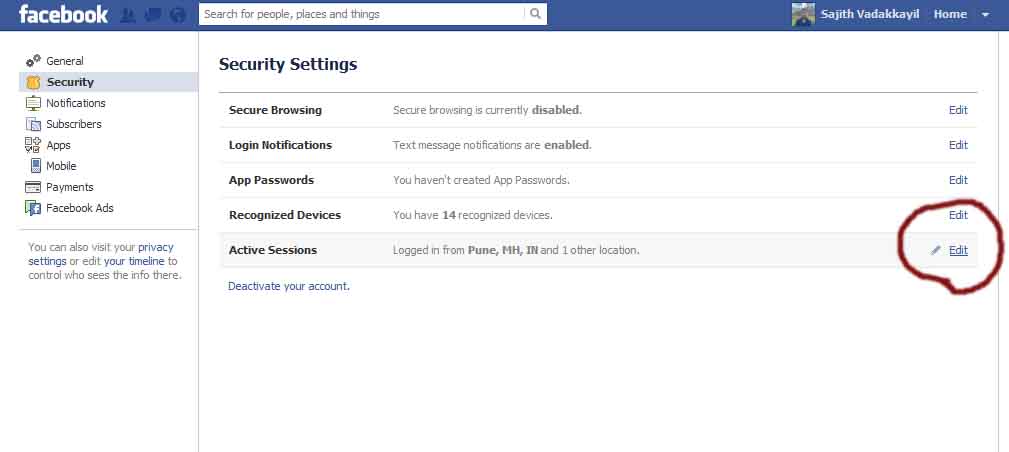
3) Click Edit of Active Sessions

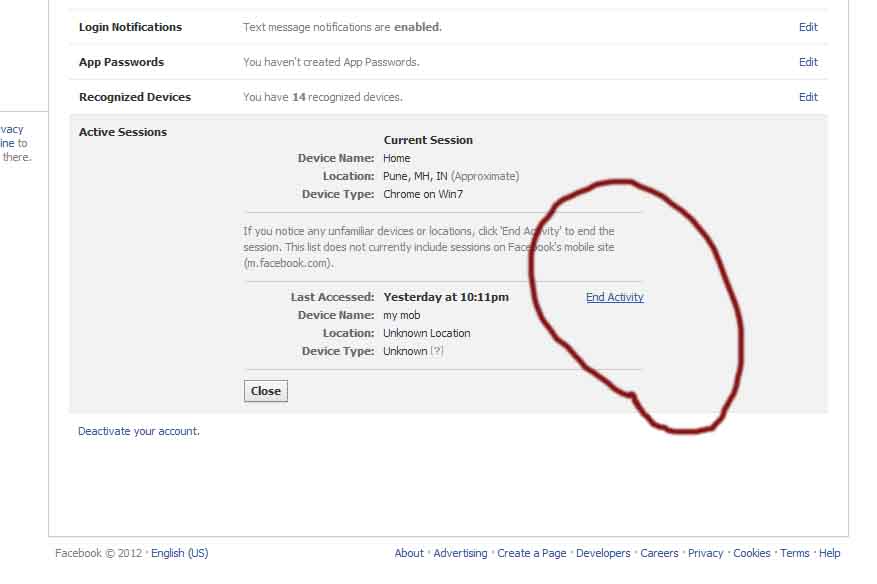
4) You are Almost Done. Now End unwanted Activities. And Click close.

Yeah! You are Done and secure now! 🙂 Keep Rocking! Pass this tip to your friends too via Us.
And thanks for reading.. Feel free to put your questions, suggestions, comments and other tips as comments. Help others too! 🙂

Filed Under: FaceBook Tips, security

Searching on Google ? some tips to improve accuracy of results.

June 23, 2012 by techiefeeds Leave a Comment


Searching on Google is easy. Type the ‘query’ or ‘keyword’ or even questions on search box and hit enter. Google is ready to show the search results less than 0.5 minutes! But searching by just keywords may not give accurate results or the results may not regards to your wish.

Today, We are discussing about some most widely used search syntax for accurate search. Syntax means, we are providing some operators also with the keyword, and mention that its not a keyword and its an operator for accurate search. for eg. ‘inurl’ is an operator.’ inurl’ operator will on search for the url’s which the searched keyword is contains. If you are using any operator, you need to separate the keyword from the operator and will not leave space b/w them. for
eg: ‘ inurl:techiefeeds ‘ the result will only be the urls/ websites which contains the word techiefeeds at its url.

Now we can scroll through some operators and its usage.

Title Search

Page titles are not page url. If you need to search for a specific topic, you just need to search for its heading. 

Eg:  ‘ intitle:Google search:Search Engine ‘
The search result should be the pages with title Google search or with title Search Engine or page with both the keywords are title.

Anchor Search

Anchor search displays the linked urls with a specific keyword. If we are giving name of a person or company, inurl operators helps us to find their mail ID or website. Because websites are giving others mail ID or websites as hyper links.
Eg: ‘ inanchor:sajith ‘.
Link Finder
With Google, Its easy to find the websites which links to your website. If abc.com is your web address, you just need to search link:abc.com. Google will find the websites with a link to your website or your to any page of your site.
Eg: ‘ link:abc.com ‘


File type Search


File type search is very useful if you are searching for files with specific file type. For example, if you are searching for a ppt (presentation) file about SEO (search engine optimization), you can just use “SEO”,filetype.ppt. you can find for any fine such as doc, sls, pdf etc.

Cache View

The cache view operator ( cache: ) is used to view last cached version of a particular site or webpage. It will help you if the webpage is in trouble and you want to visit that site’s cached copy. Cached copy may one or two days before updated contents only.
Eg: cache:techiefeeds.blogspot.in


Text Search


Text search is used to search only on the body of web pages. When we are giving keyword along with this operator ( intext: ), Google will not consider url or titles of any webpage and the searching is purely based on the body of the websites.

Filed Under: Google

What to do if Accidentally clicked on my own Adsense Ad?

June 9, 2012 by techiefeeds Leave a Comment

Google Adsense accidentally click

I have used a laptop log back and try to avoid it! because I clicked my own adsense ads twice a day while am  moving courser through by blog using touch pad. As our agreement with Google as a publisher I have dug up their rules.

If you don’t Know.

Clicking on your own ads is a violation of Google Adsense terms and conditions. It is also a violation if you coerce friends and families to do the same. Mean while, Google cannot find who the people are but their servers can verify whole clicks received on your ads and smell if there are too many clicks from a relatively small area ( Remember, world is a big place). Google gives importance and value to both Adsense publishers and Advertisers. So, Your Adsense account will disapproved and you/your address should be banned from Google Adsense that means, you cannot create another account. 

Invalid Clicks.

This is is term defined excluding accidental clicks. As Google states :

 Although publishers are not permitted to click on their own ads for any reason, we do understand that accidental clicks may occur. We there for don’t require that you contact us every time clicks on your own ad slots. Rest Assured that your account is being properly credited for all clicks and impressions we consider to be valid. 

If you’d like to read the complete document, found it here. Google keeps a record of wheres clicks came and flags if same activity occurs too often.

If found an Unusual Activity on your Adsense Ad.

If you happen to notice that some unusual click activities on your Adsense Ad, you must notify Google (Adsense) immediately. the notification form can be found here. It is currenlty not possible for Google to block IP addresses. But they have an Adsense preview tool if you would like to check out an ad without clicking it. Found it here.

Own Page views.

Google will not seriously care about this. Its clicking on the ad ads they care about. But Adsense only counts normal page views as their Ad impression. Thats why, Techie Feeds allows its authors to post their ads too and views by our other authors and users will be count normal impression as their.
signup on Techie Feeds here as an author.

Surges in traffic

Google is a smart company and it treat its users brilliantly. So they don’t need if you expect a surge As previously said they know how and when impressions came from.and are more happy if its look normal.

Thanks for Reading this Post.:) If you have any questions or comments, feel free to let me know!

Filed Under: Google, Tech Updates

SEO clerks Affordable SEO

May 31, 2012 by techiefeeds Leave a Comment

SEO is the major part of any blog / website. Because it helps you to get more traffic from search engines like Google. 
SEO (search engine optimization) has been never easy. And due to changes in Google algorithm’s, both freelancers and SEO companies have raised their prices. You need to pay $100+ for SEO companies.
If you are searching for an option for getting Quality SEO at cheap rates, there are two options.
First one is, to learn optimization and research on it and optimize your website/blog yourself. But it should be tough for newbies. Because, as told later, SEO is never easy.
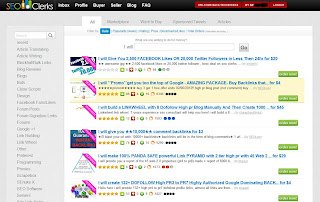
Now, the second option is to try out SEOclerks.com where you will be able to buy high quality SEO services at affordable prices starting from $1 to $55. I found SEO clerks by Google search for quality SEO services.
If you are searching for an affordable, quality SEO service, Your search too ends here.
Why I recommend SEOclerks?


Simple & Safe: SEOclearks.com is simple and safe. No programming knowledge required.You can get started within few minutes. You can buy or sell gigs, faster and easier.
For everyone: No matter you are a professional or a newbie. You don’t need to be experienced in web development or SEO to use SEOclerks.com. You can sell or buy gigs easily. If you’re a professional, you can choose apt one for your site, Facebook fan page, or twitter etc. And if you are newbie, you can choose gigs from category matched to your blog/site.
Affordable Pricing: SEO clerks price its services reasonably. Ranges b/w $1 to $55. And it’s the cheapest price and provides quality SEO.

Update (7/07/2015): If you need an SEO or Digital Marketing package, Freelancers might be the cost effective option to choose. Contact Freelance SEO expert, Sajith V via [email protected]

Filed Under: Reviews, SEO

Create High Resolution Photo Colleges.

May 28, 2012 by techiefeeds Leave a Comment


Today We are discussing about an online tool which helps us to create photo collages using our photos photos.


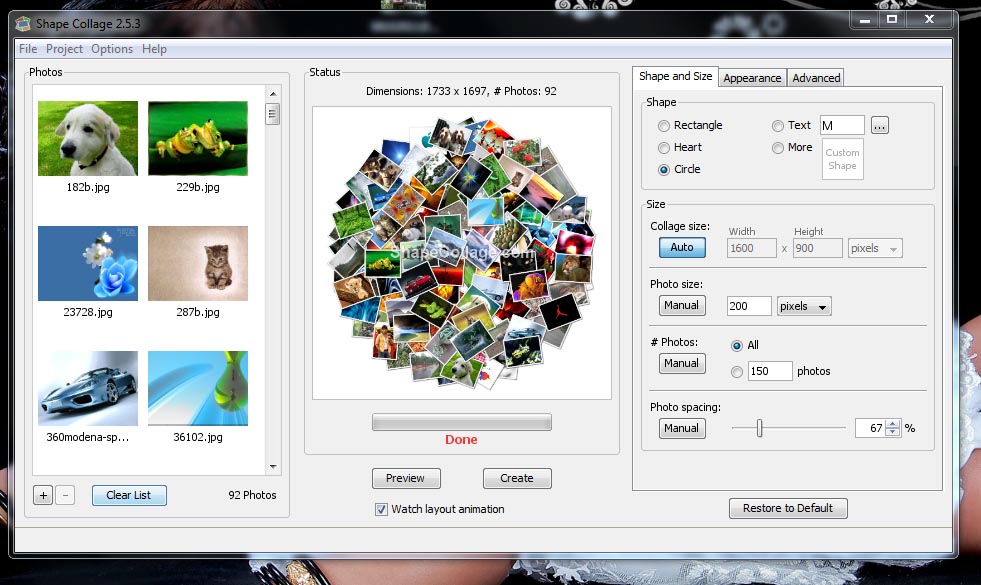
Vincent Cheung, Who has previously worked at Microsoft Research and Google, Developed an automatic photo college software that can create extremism impressive collages using your pictures. Here is some snap shots of collages created using Vincent’s software.

Called ShapeCollage.com. Its light weighted (~ 300 kb) and written in JAVA. So it works same Microsoft, Mac OS and Linux with same package.

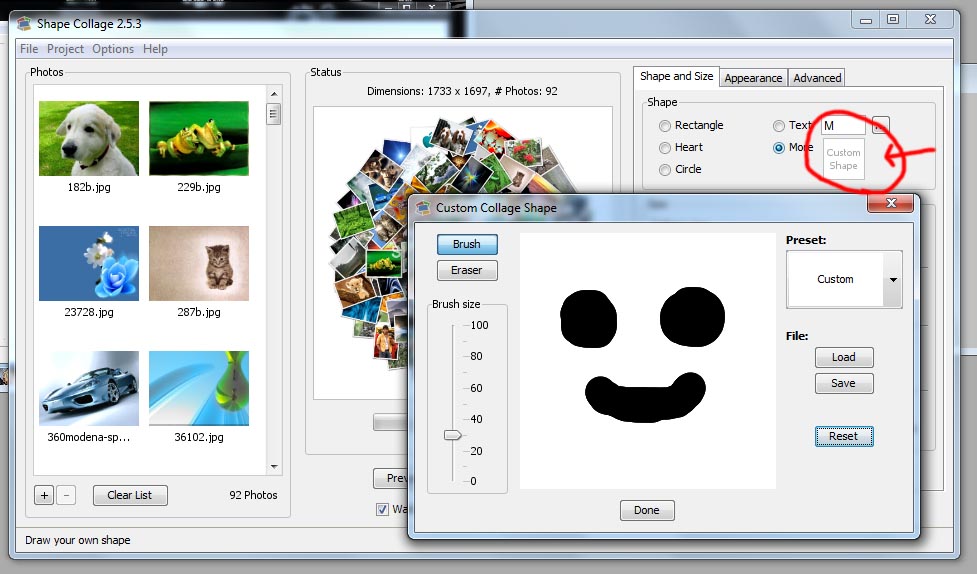
You can either select individual snaps, or folder containing photo can select for creating the collage or poster. Then you select a snap from your college – Its could be a drawing, pile scattered images, or you could draw some shapes using mouse and  Shape Collage  will match the layout of your collage with that shape.

Shape Collage can save your collages / posters as high resolution JPEG or layered PSD files. So your are free to edit the college / poster after using professional image processing software such as Adobe Photoshop or GIMP.


This Photo Collage Software let you crate Text photo Collages – You can simply write text using installed fonts and Shape Collage will arrange pictures by the layouts of your Text.


Also Read our post about creating Photo Collage using photos on web such as from your Website, Facebook,  Twitter, or even from Google Image Search Here.

Feel Free to post your Comments, Questions, Feedback etc. .as Comment below 🙂 We are eagerly waiting for your response ðŸ™‚ 

Filed Under: Downloads, Tech Updates

How to Create A Photo College Using your Pictures on Web.

May 28, 2012 by techiefeeds Leave a Comment

On last post, We have discussed how to create Photo Collages using photos on our hard-disc. That was a software called Shape Collage. Now We are  posting a new service from the Team of Shape Collage called GetLoup.com.


Loups helps Us to Create Photo Colleges from Social Network Sites such as, Faceook, Twitter, Google + etc.. and and even from Search results and your own URL’s. 

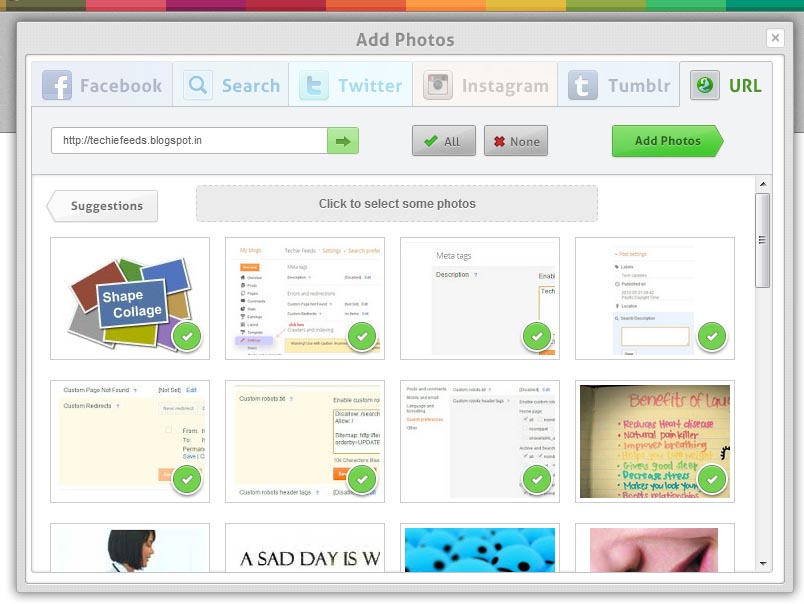
While you are entered to the Loup website, You need Add your Photos first. It may be from Facebook, Search, Twitter, Instagram, Tumblr, or even from your own url.
Here We have selected pictures from our Blog and selected All images. Now We need to Add photos.
The Next very simple Process is Click the green Add Photos on the previous box itself. And Select Shape you your college want to be.


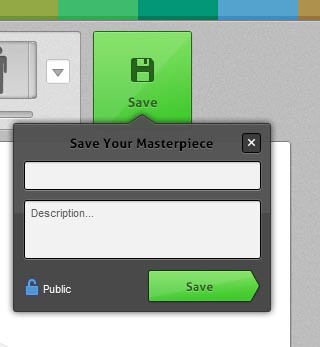
Yeah! Your Photo Collage is Ready to save. Click on The Green Save button and give, Title and description for your collage.


The Image should be saved on your Facebook profile. You can save to your hard disc by right click on the image and save.
Feel Free to Post your Feedback, Doubts etc.. As comments. We are eagerly waiting 🙂

Filed Under: FaceBook Tips, Tech Updates

BLOGGER SEO MADE EASY WITH SEARCH PREFERENCE OPTIONS ON NEW UI.

May 21, 2012 by techiefeeds Leave a Comment

   Good news for all Bloggers..! Blogger has been introduced a new search preference option. Now bloggers    can easily add meta tags, customize Robots.txt, Redirects, 404 Error page, and alt and title for images.

SEO is a majot part of any website / blog to list on search results of search engines. Before, during the old  UI, blogger had not supported SEO. But now, in new UI of blogger, the SEO fuctions are fully functional and dynamic. Now you can set meta tags for each posts and Robots tag separately.

BLOGGER ADDED THE FOLLOWING ON NEW UI
1. Search Meta description.
2. Custom post meta description.
3. Coustom 404 Error.
4. Coustom Robots.txt
5. Redirects.
6. Couston Robots header Tags.
7. Alt and Title tags for Images.

ENABLE SEARCH PREFERENCE OPTION.
This option is only available in New blogger UI. to Enable Search preference option,
Go to New Blogger Dashboard > Select the blog and select settings Tab > Search preference.

SEO on New blogger UI


SEARCH DESCRIPTION
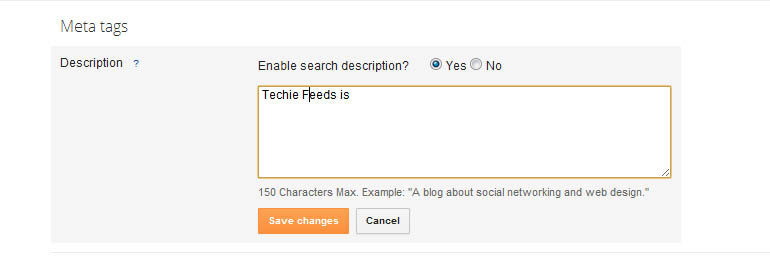
  This is the general description of Home page to optimize the Home page / Blog. And visible on the seach results. Search Description should be a short description about your blog and max. 150 characters in English.
The search description may disabled in default. You need to click on the Edit button > the Yes. hence description can written on the white box. max. of 150 letters.
Search description for blog on blogger
CUSTOM POST META DESCRIPTION

This is the custom Post Meta description for each and every individual post.You can easily set and customize the Each post while creating it or editing the post area. It is placed on the left side of the post editor.

custom post meta description on new blogger UI.
CUSTOM 404 ERROR PAGE

This is also a new option from blogger.
Say Good bye to blogger default 404 page not found error page. Now you can customize your 404 error page. This redirect is 302 temporary and redirection is send through HTTP Headers..
blogger custom 404 Error page

CUSTOM ‘ROBOTS.TXT’

Blogger has provided to edit and customize the robots.txt file. This is the key file for seach engine bots.   
Using this Robots.txt, you can allow or Block search engines from indexing the pages. Usually, every blog has a robots.txt file.You can find your robots.txt file using the url, 
http://yourblogname.blogspot.com.robots.txt.  
Robot.txt file for Techie Feeds is : http://techiefeeds.blogspot.com/robot.txt.
customize robots txt on blogger SEO made easy

Warning : Changing or Modifying the Robot.txt file wrongly may effect visibility of blog on Search Engines.
You can set the Robots tags to home page, Archive/label pages, Post pages on Crawlers and indexing Searching on search preference tab.
ALT AND TITLE TAGS FOR IMAGES

Alt and Title tags for images helps for indexing images. Your images are easily indexed by image bots like Google Image bots.
To set Alt and Title tags for Images,
1. Upload and Add the Image.
2. Click on the Image.
3. A small menu bar will be displayed, and choose Properties option
4. On the popup prompt, Enter the Alt and Title tags for your Image.
Thanks for reading this Post. If you have any question or comments, Feel free to let me know!
Like this post? Thanks to Blogger team 🙂  Follow us on  Facebook | Twitter

–>

Filed Under: Blogging, Google, Tech Updates

DOWNLOAD YOUR INFORMATION FROM FACEBOOK

May 3, 2012 by techiefeeds Leave a Comment


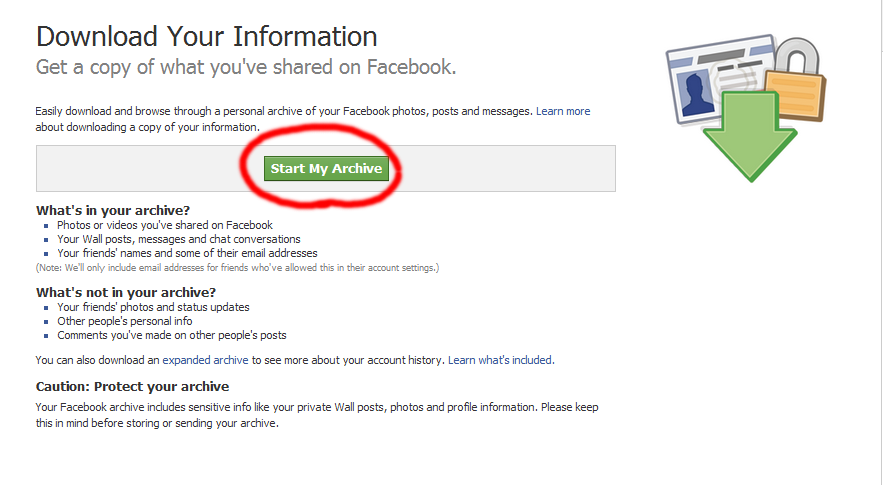
It has very few easy steps to download the data including photos and videos, posts on your wall, all of your messages, and also your friend list and all other  you have put upon your  Facebook profile. It’s an easy way to protect your data missing by accidental or by hacking. Now A days many of people are directly uploading photos, videos, or even documents to Facebook or some such websites and accessing it through internet. This is surely a good way for managing photos or even documents. Because losing of our space on Hard Disc or memory cards can prevent. And easy to access anywhere if have an Internet connection. But there may be some situations like missing our photos’s or even photo albums by accidental deletion or by virus. So it is always better to make a copy of all so Facebook provides an easy way to download all your informations from Facebook including photo albums, videos, post on wall, messages and etc…. Now, We are going to the step by step procedure for downloading Facebook account.

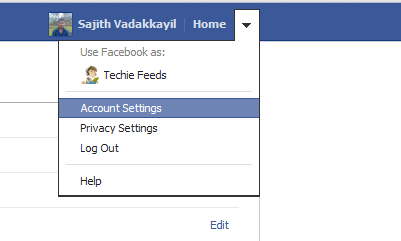
1) Firstly go to, Account settings
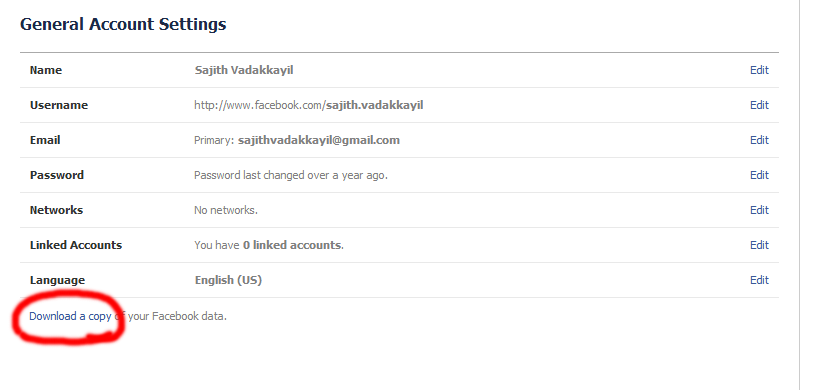
2) Now,  Click on the ‘download copy’ link
3) Click on the ‘Start Archive’, and you are almost done 🙂
4) Once your archive is ready to download, FB will mail to you. and you can download your data from there.
Like this page? Follow us on  Facebook | Twitter

Filed Under: FaceBook Tips, Tech Updates

Put Smile and live Longer…!

April 27, 2012 by techiefeeds Leave a Comment


Are you a kind of person who suffers more tension?   Do you often feel sad or disturbed? then this is the right place for you. Here is a perfect, simple, and side effect free medicine for your problem. it’s just a ‘SMILE’ 😀
!! Not a joke, It has been scientifically proven. Science proved that, the more you smile younger, the the more you look and live younger too.


Smile and say Good bye to BP ( Blood Pressure ).

High blood pressure is a major health risk now a days. When you smile, your blood pressure low to a notable range. Can’t believe??? Try this from your home or hospital. Required is only a blood pressure meter.
Step 1: Sit silently for few minutes and check your blood pressure. Step 2 : And smile a few minute and once more check your blood pressure. You will surly smile while noting the difference b/w these resulls 🙂

Improves your immune system.

Smiling improves your immune system and work better. While you smile, get relaxed and hence your immune system gets boosted. You can prevent flu and cold just by smiling at them. Since you have good immune system, normally you live longer.

Smile to release Endorphin and Serotonin.
A smile releases endorphin, natural pain killer, and serotonin, which are chemical substance who are join together makes us happy.Smile has proven as a natural stress and pain reliever.


Exercise for your face that makes you look younger.


Smiling is a good exercise for your face. A simple smile uses all muscles in your face. Which makes you more younger.

Smile and get rid of stress.


Stress can impose a major threat in your health. When you feel your are on an high stress, put a smile. Smiling is the best way to fit your mind. Entertaining with comedy scenes will cause a better laugh.


Filed Under: Lifestyle, Personal

  • « Go to Previous Page
  • Page 1
  • Page 2
  • Page 3
  • Page 4
  • Page 5
  • Page 6
  • Go to Next Page »

Primary Sidebar

Copyright © 2026 TechieFeeds.com